
You know your customers exist. But do you really know who they are?
Most businesses skip this step and wonder why their marketing falls flat. Creating a persona changes that. This master guide walks you through building user personas, buyer personas, customer personas, marketing personas, and B2B personas.
At Intuitia, we have spent years refining UX and product development strategies. The secret often starts with one thing: a well-crafted persona. A persona is a semi fictional representation of your ideal customer based on real data and research. It gives your team a shared understanding of who you are designing for, selling to, and supporting.
Research backs this up. Companies that exceed revenue and lead goals are significantly more likely to have documented personas, with 71% of high-performing organizations using them compared to just 37% of underperformers. When you create a persona, you stop guessing. You start building products and campaigns that connect.
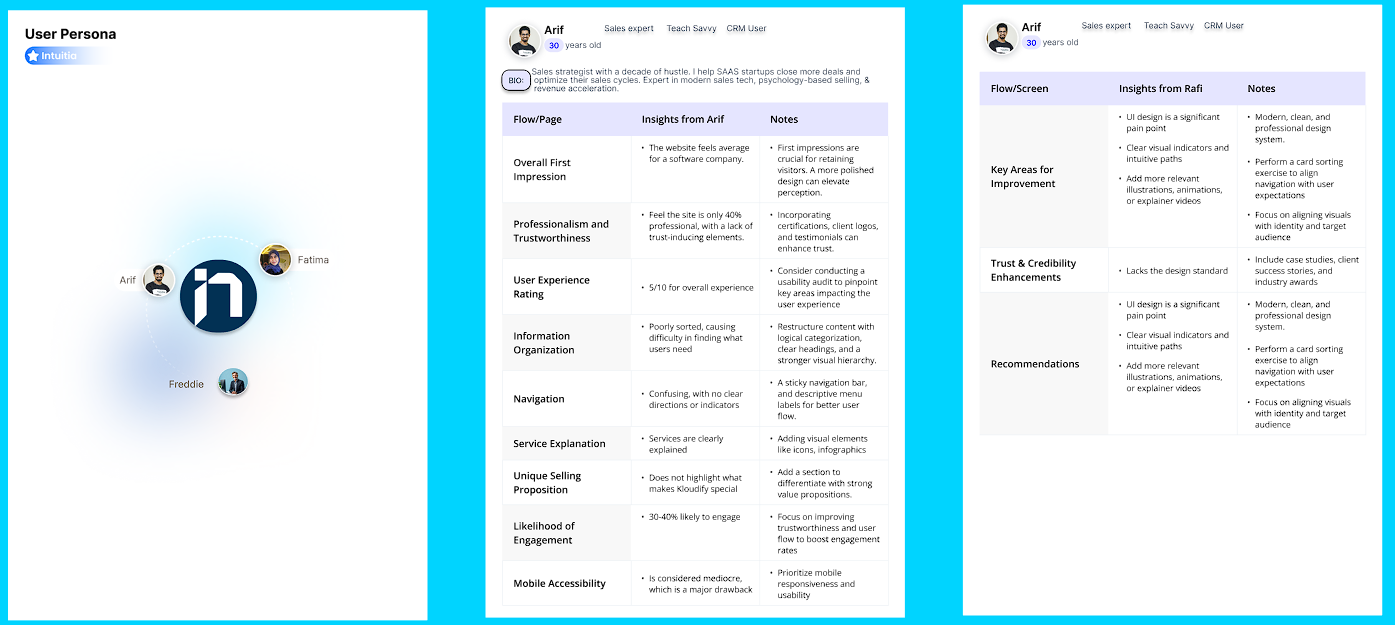
Building a persona is not guesswork. It follows a clear structure. Many teams mistake a persona for a profile of a single customer. It is not. A user persona is a fictional character that represents the average of a specific group of users.
The Smoothie Analogy: You interview 500 different people. You cannot design a product for 500 individuals separately. Instead, you put all that data into a blender. The result is a single "smoothie" that captures everyone's traits. If 80% of your users are tired parents, your persona becomes a "Tired Parent." If most struggle with small text, your persona has "Visual Frustrations."
This humanizes the data. Instead of saying "analytics show a 60% drop-off at checkout," you can say "Sarah abandons the cart because she doesn't trust the security badge." It makes the problem real. Mir Ashfaque, COO & Design Director at Intuitia, shares his proven 5-step process below.
Before you talk to anyone, make an educated guess. Ask your stakeholders: Who do you think your users are?
This gives you a starting point to test against. Write down basic characteristics you expect. Age range, likely goals, potential pain points. This hypothesis keeps your research focused. Without it, you collect random data that leads nowhere.
This is where you get into the user's head. You need two types of insights working together.
Quantitative data tells you the what. Pull from website analytics to see behavior patterns. Send surveys asking about demographics and preferences. Check CRM systems for purchase history. The stats might show "60% of users are on mobile" or "average session time is 3 minutes."
Qualitative data tells you the why. Conduct one-on-one interviews with 10-15 customers per segment. Listen to their pain points directly. Run focus groups to hear natural conversations. Read through customer support tickets for recurring frustrations.
Research tools that help:
Now you look for trends in all that data. This is where Dovetail becomes essential as your synthesis tool.
Organize your research by themes. If 15 out of 20 people say they don't have time to watch tutorials, "Time-Poor" becomes a key trait. Dovetail helps you tag common phrases across interviews, surveys, support tickets, and behavioral data all in one place.
The tool stays trained to find common patterns and then summarize collected data clearly. What frustrations appear most often? Which goals get mentioned repeatedly?
Dovetail provides analysis insights, reporting, and structured decision support across research stages. Instead of manually sorting through spreadsheets, you get visual reports showing which themes dominate your research.
Zapier also supports this workflow by automatically feeding new data into Dovetail as it comes in.
Time to visualize everything you learned. A strong persona document includes these core components:
Write in first person when possible. "I need simple tools because I juggle three projects" feels more real. Keep it to one page.
Design tools for personas:
AI for quick drafts (with caution): If you have zero data, AI can generate a provisional persona to get the ball rolling. But this is pure assumption. Always validate with real humans before making decisions.
You created a persona. Now test it against reality. Share the profile with actual customers who match that segment. Do they recognize themselves?
Show it to sales reps who talk to prospects daily. Run it past customer support who handle frustrated users. Does everyone agree this feels accurate?
Use the persona in real projects as a litmus test. When making design decisions, ask "would Alex find this valuable?" Refine based on what you learn. Schedule regular validation cycles. Review personas quarterly for fast-moving industries or annually for more stable markets.
AI for testing ideas: Feed your validated persona into an AI and say "You are now Sarah, a busy marketing manager. I am going to show you a new feature. Tell me how you feel about it." This lets you test concepts before building prototypes. Only use this after you have validated your persona with real research.
Best practices for AI integration: Use AI to speed up grunt work like transcription and pattern recognition. Keep humans in charge of interpretation and decision-making. Never skip validation just because AI gave you an answer.
Personas are not just nice-to-have documents. They drive measurable results across every department.
For UX and product teams, personas provide focus. Instead of designing for everyone, you optimize for specific user needs. Research shows that marketing personas can make websites 2-5 times more effective and easier to use by targeted users. Strong UX design consulting starts with understanding who you are designing for.
For marketing teams, personas sharpen messaging and targeting. One study found that using personas in email campaigns improved open rates by 2x and clickthrough rates by 5x. You stop writing generic copy. You address specific pain points in language your audience uses.
For sales teams, personas speed up qualification and objection handling. When you know decision criteria upfront, you can tailor pitches. You anticipate concerns before prospects raise them.
Financial impact speaks volumes:
Beyond numbers, personas create alignment. Everyone from interns to executives shares a common understanding of who you serve. Debates about features or messaging become easier when you can ask "would Sarah find this valuable?"
Different personas serve different purposes. At Intuitia, we recommend matching persona types to your specific goals.
A user persona focuses on how people interact with your product or service. This is the gold standard for UX design, product management, and user personas agile teams.
Key characteristics:
Example: Alex Chen, a freelance graphic designer who needs cloud storage that syncs seamlessly across devices. Alex values speed and simplicity over advanced features.
User personas help design teams make interface decisions. Should navigation be visible or hidden? Does this feature add value or complexity?
A buyer persona zeroes in on the purchase decision. Marketing teams rely on these to optimize campaigns, content, and conversion funnels.
What makes it different:
Example: Jennifer Park, a small business owner researching accounting software. She compares three options, reads reviews obsessively, and needs approval from her business partner.
Buyer personas inform content strategy. What blog posts answer Jennifer's questions? Which case studies address her concerns?
Customer personas look beyond the purchase to long-term relationship and retention. Customer success teams use these to reduce churn and increase lifetime value.
Focus areas include:
Example: Marcus Thompson, an existing customer who loves your core product but struggles with advanced features. He prefers video tutorials over documentation.
This persona type helps customer success teams prioritize outreach and develop retention strategies.
Marketing personas blend elements from buyer and customer personas with added emphasis on channel preferences and content consumption habits.
Unique elements:
Example: Rachel Kim, who discovers brands through Instagram, reads industry newsletters weekly, and trusts recommendations from LinkedIn connections.
Marketing teams use these to allocate budget across channels and plan content calendars.
B2B personas account for complex organizational buying with multiple stakeholders. Sales and account management teams find these invaluable.
B2B-specific details:
Example: David Nguyen, IT Director at a 500-person manufacturing company. He evaluates security and integration but needs CFO approval for purchases over $50K.
B2B personas often come in sets representing different roles in the buying committee.
Negative persona (also called exclusionary persona) defines who you do NOT want as a customer. Maybe they churn quickly, cost too much to support, or don't align with your product vision.
Proto-persona is a lightweight assumption-based version created before extensive research. Teams in early stages use proto-personas as placeholders, then validate and refine them with real data.
Ux avatar is essentially another term for user persona, emphasizing the visual representation aspect common in design thinking workshops.
Seeing real examples makes the persona creation process click. Here are two complete persona examples you can adapt.
Name: Lisa Rodriguez
Age: 29
Role: Project Coordinator at a digital marketing agency
Location: Remote (based in Denver)
Education: Bachelor's in Business Administration
Background: Lisa coordinates 5-8 client projects simultaneously. She works with a distributed team of designers, developers, and strategists across three time zones.
Behaviors: Checks project status first thing each morning. Prefers visual dashboards over detailed reports. Makes quick decisions when she trusts the tool.
Decision Criteria: Free trial is mandatory. Must integrate with Slack and Google Workspace. Responsive customer support during onboarding.
Preferred Channels: LinkedIn for professional content, YouTube for tutorials, email newsletters from trusted sources.
Name: Robert Chang
Age: 42
Role: VP of Sales at a B2B tech company (200 employees)
Location: San Francisco Bay Area
Education: MBA from top business school
Background: Robert leads a 25-person sales team selling enterprise software. He's under pressure to hit aggressive growth targets. His team uses multiple tools for CRM, outreach, and analytics but lacks cohesion.
Quote: "I need tools that help my team sell more without adding complexity."
Goals:
Frustrations:
Motivations:
Decision Process: Researches for 2-3 weeks reading analyst reports and peer reviews. Demos 3-4 vendors. Requires buy-in from sales ops and at least two team members.
If Intuitia provides downloadable templates, you can adapt these formats to your specific business needs. Start with the structure above and replace details with insights from your own research.
You do not need expensive software to build great personas. But the right tools speed things up.
Figma (Free + Paid)
Popular among design teams for creating visual persona cards. Drag-and-drop interface makes layout easy. Free plan works for most small teams.
UXPressia (Paid, free trial available)
Purpose-built for personas, customer journey maps, and impact maps. Includes persona templates and export options. Pricing starts around $20/month.
HubSpot Make My Persona (Free)
Simple web-based persona generator that walks you through questions. Generates a basic persona card you can download. No account required.
Delve.ai (Paid)
AI-powered tool that automatically generates personas from your website analytics and social media data. Best for businesses with existing traffic and customer data.
Miro or Mural (Free + Paid)
Digital whiteboard tools great for collaborative persona workshops. Not persona-specific but flexible for brainstorming. Free plans available.
Xtensio (Free + Paid)
Template-based platform with persona creation features. Clean layouts and easy editing. Free plan lets you create one persona.
Google Docs or Notion (Free)
Sometimes the simplest option wins. Create a template once and duplicate it. Free, familiar, and easy to share.
User persona AI tools are emerging but treat outputs as starting points. AI cannot replace actual customer research. Use AI to organize data or suggest insights, then validate everything against real users.
Choose based on your team size, budget, and workflow. A well-researched persona created in Google Docs beats a pretty but assumption-based persona from premium software.
Even experienced teams trip up on persona creation. Watch for these errors.
1. Basing personas on assumptions instead of data
You think you know your customers. Always start with user research. Interview real people. Look at actual behavior patterns in your analytics.
2. Creating too many personas
More is not better. Five personas means nobody remembers the details. Start with 2-3 core personas representing your largest segments.
3. Making personas too vague
"Sarah is a busy professional who values quality" tells you nothing useful. Get specific. What makes Sarah busy? Which quality factors matter most?
4. Forgetting to include pain points
Goals alone are not enough. Understanding frustrations helps you position solutions. A persona without pain points misses half the story.
5. Skipping validation
You created a persona. Now test it. Show it to actual customers. Use it in real projects. If it does not reflect reality, it will not drive results.
6. Treating personas as a one-time project
Markets change. Products evolve. Customer needs shift. Schedule regular reviews to keep them relevant.
7. Using only demographic data
Age and job title matter, but behaviors and motivations matter more. Two people with identical demographics can have completely different needs.
8. Creating personas in isolation
Persona work should involve multiple departments. Sales talks to prospects daily. Support handles frustrated customers. Get input from everyone who touches customers.
9. Making personas too complex
A five-page persona document sits in a folder unused. Keep it simple. One page works for most teams.
10. Forgetting about negative personas
Knowing who you do NOT serve is as valuable as knowing your ideal customer. Negative personas help teams avoid wasting time on poor-fit prospects.
Personas bridge the gap between abstract data and human understanding. They turn spreadsheets into stories. They give teams a shared language for talking about customers.
The persona creation process takes effort upfront. Research, segmentation, and validation require time. But that investment pays off every time you make a product design decision, write marketing copy, or prioritize features.
Start simple. Pick your most important segment. Gather data through interviews and analytics. Build your first persona template focusing on goals, pain points, and behaviors. Share it with your team. Use it in real projects.
Whether you are designing a user persona for UX work, building a buyer persona for marketing, or developing customer personas for retention, the fundamentals stay the same. Real research plus clear structure equals actionable insights.
Ready to create personas that actually drive results? Download our template to get started. Or reach out to Intuitia for hands-on guidance in persona design thinking and UX strategy. Your customers are waiting to be understood.
How many personas should a business have?
Most businesses work best with 2-4 primary personas. Start with your largest or most valuable segments. Too many personas dilute focus and make it hard for teams to remember key details.
Does a persona have to look like me?
Absolutely not. Personas should reflect your actual target audience, not your team demographics. Base personas on research data about who uses or buys your product.
What is the difference between persona and audience segment?
An audience segment is a group of people sharing characteristics like age range or purchase behavior. A persona is a detailed semi fictional representation of one person within that segment.
How long does it take to create a persona?
Budget 2-4 weeks for research, interviews, and validation if starting from scratch. The actual persona card takes a few hours to build once you have data.
What is a persona in UX?
A persona in UX is a user persona focused on how people interact with products or interfaces. It emphasizes tasks, workflows, usability goals, and pain points related to using technology.



.svg)









.svg)