
Your website is losing visitors before they even scroll. Eighty-eight percent of users won't return after one bad experience. They land on your site, judge it in seconds, and decide whether to stay or leave. Outdated design, slow load times, or confusing navigation any of these sends them straight to your competitors.
The stakes are higher than aesthetics. A website redesign affects your SEO rankings, conversion rates, and bottom line. But most guides only cover design or development or SEO in isolation. They leave gaps that cost you traffic and revenue.
This framework walks you through the complete redesign process: discovery and research, strategy and information architecture, UX design consulting and UI implementation, development with SEO migration, and testing before launch. Follow this approach and you'll redesign with confidence while protecting the organic traffic you've already built.
Your website is losing visitors before they even scroll. Eighty-eight percent of users won't return after one bad experience. They land on your site, judge it in seconds, and decide whether to stay or leave. Outdated design, slow load times, or confusing navigation any of these sends them straight to your competitors.
The stakes are higher than aesthetics. A website redesign affects your SEO rankings, conversion rates, and bottom line. But most guides only cover design or development or SEO in isolation. They leave gaps that cost you traffic and revenue.
This framework walks you through the complete redesign process: discovery and research, strategy and information architecture, UX design consulting and UI implementation, development with SEO migration, and testing before launch. Follow this approach and you'll redesign with confidence while protecting the organic traffic you've already built.
Think of redesigning your website like renovating a house. You wouldn't tear down walls without a blueprint. Same principle applies here.
The best redesign process follows either a full-cycle or half-cycle approach depending on your project scope. Full-cycle redesign involves a complete overhaul with extensive research and rebuilding from the ground up. Half-cycle redesign focuses on specific improvements without rebuilding everything. Most businesses underestimate which approach they need and assume surface-level changes will solve deep structural problems.
The smartest approach breaks everything into five clear phases. Each phase builds on the last. Skip one and you risk building on shaky ground.
You can't fix what you don't understand. Start by digging into how your current site performs from a design perspective.
Begin with a design-focused audit of your existing website. As a designer, first examine visual hierarchy, typography consistency, color usage, and spacing patterns. Check whether design elements align with modern UI standards. Review navigation clarity, call-to-action visibility, and overall aesthetic cohesion.
Then move to technical analysis using tools like Google Analytics, Hotjar, or Screaming Frog. Look at bounce rates, exit pages, and conversion paths. Check page load speeds, mobile responsiveness, and broken links. Document every design flaw and technical issue you find.
This comprehensive audit becomes your baseline for measuring improvement after the redesign. Note which pages perform well and which need urgent attention.
Generic assumptions about users lead to generic websites. Start by requesting existing persona documentation from your client. Many businesses already have customer personas from previous research or marketing initiatives.
Review these existing personas carefully. Do they still accurately represent the current user base? Has the target audience shifted? If existing personas are outdated or incomplete, conduct fresh user research through surveys or interviews. Ask real customers what frustrates them about the current site. Talk to the sales team about common customer questions and pain points.
Build 3-5 distinct personas representing key user segments. Include their goals, pain points, browsing behaviors, device preferences, and decision-making factors. These personas will guide every design decision you make throughout the redesign process. Get client approval on finalized personas before moving forward.
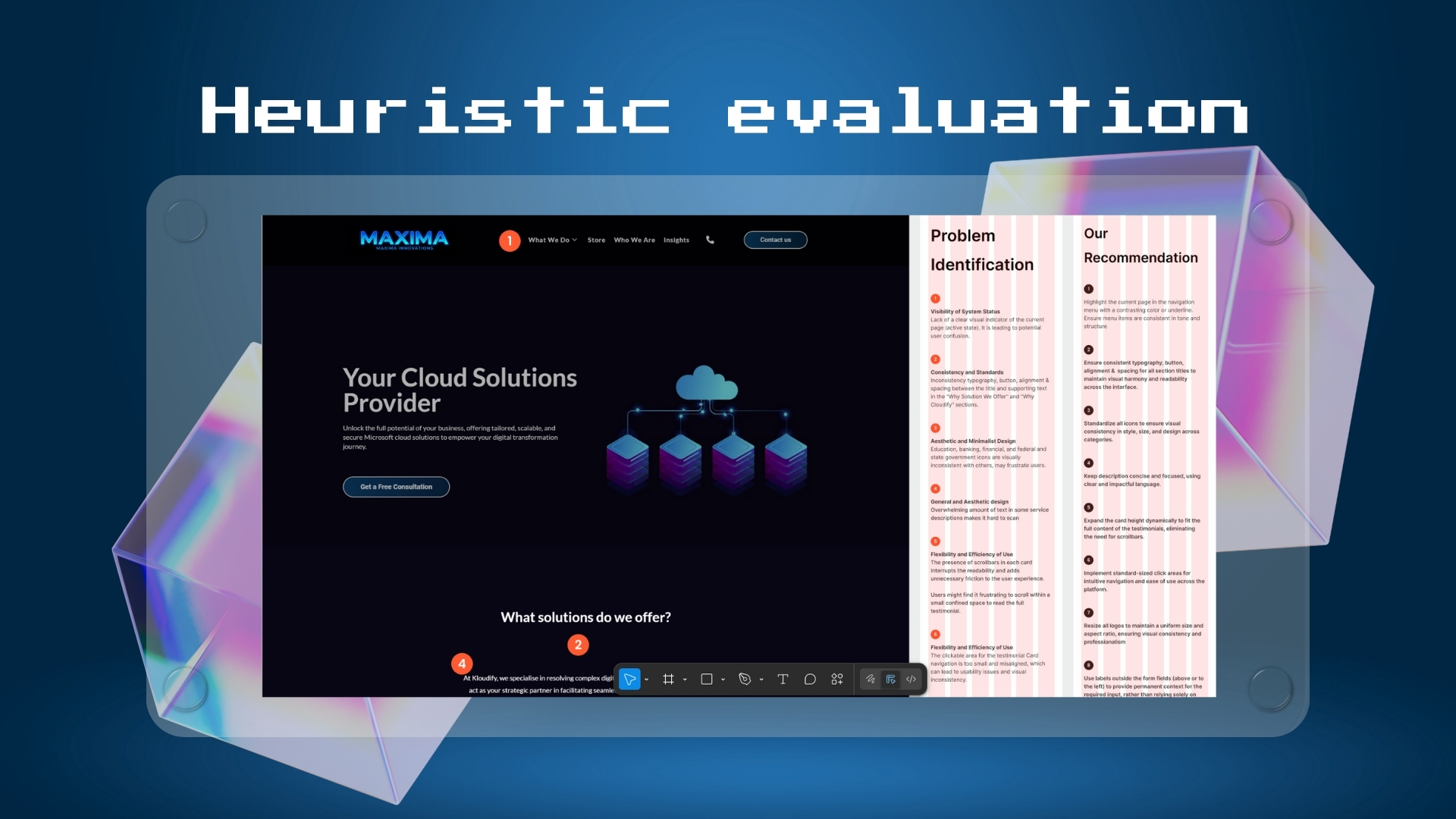
Heuristic evaluation is one of the best practices in UI/UX design for identifying usability flaws systematically. This method reviews your site against established usability principles before investing in redesign work.
Walk through your site as if you're a first-time visitor. Apply Nielsen's 10 usability heuristics or similar frameworks. Check for consistency, error prevention, user control, recognition over recall, and aesthetic minimalism. Document specific examples where the site violates best practices.
Compare your findings against user feedback from the client. When heuristic evaluation aligns with what users report, you've found critical problems to address. This validation ensures you're solving real issues, not assumed ones.
Establish visual direction through mood boarding as part of your initial research. Schedule a creative brief session with your client to understand their brand vision, target emotions, and aesthetic preferences.
Beyond mood boards, develop a comprehensive style guide that will govern the entire redesign. Work with your client to define or refine their brand guidelines. This includes typography hierarchy with specific font families, weights, and sizes for headings, body text, and UI elements.
Define the complete color palette including primary, secondary, and accent colors. Specify exact color codes for consistency. Document spacing systems, button styles, form elements, and iconography standards. This style guide becomes the single source of truth for all design decisions moving forward.
Mood boarding prevents subjective design debates later. With approved mood boards and a solid style guide, you have a clear direction that everyone agrees on.
When developing a mood board, analyze competitor design trends. Review their websites to understand the visual landscape, identify their design styles, and find opportunities for differentiation while meeting user expectations. Document standout patterns and missed opportunities.
This competitive research informs your mood boards, strategically positioning the redesign within the market.
Compile all your Phase 1 findings into a CRO report (Conversion Rate Optimization report). This document synthesizes insights from your design audit, user personas, heuristic evaluation, and competitive analysis into one comprehensive resource.
The CRO report identifies key conversion points on your current site, documents friction areas preventing conversions, and highlights opportunities to improve user flow. It becomes your baseline for measuring improvement after the redesign and ensures the entire team understands what needs optimizing.
Key actions for phase 1:
Phase 1 sets your foundation. Get this right and everything else flows naturally.
Now you know what's broken. Time to plan how you'll fix it.
Set your website redesign objectives clearly. Do you want to decrease bounce rate by 20%? Increase conversions by 30%? Write these goals down with specific metrics. Determine the business goals driving this redesign. Are you launching new products? Entering new markets? Your site structure should support these strategic objectives.
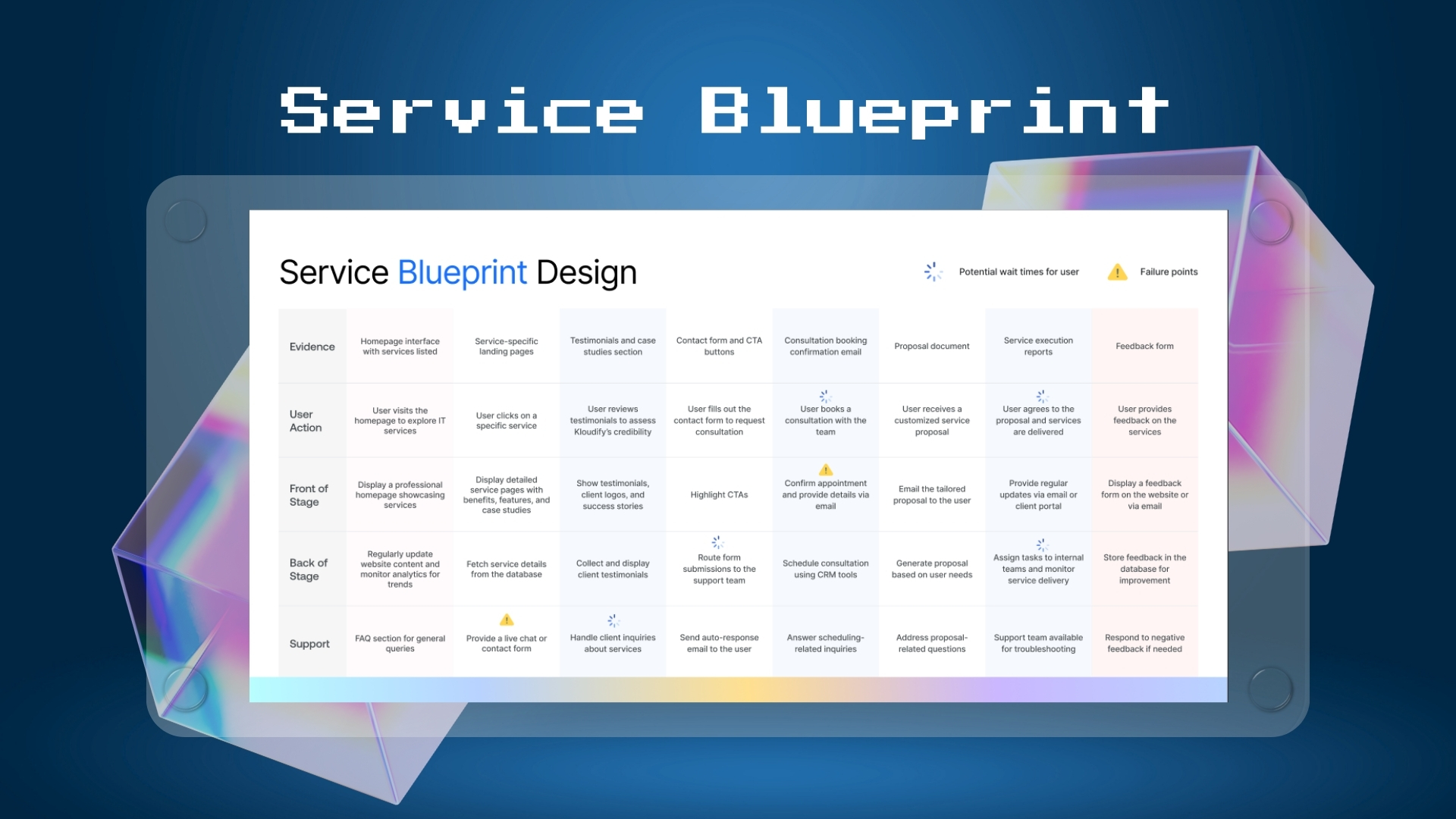
Information architecture (IA) means organizing your content so people can find what they need. Start by mapping your service blueprint to understand how your business delivers value to customers. How will the new site improve customer touchpoints? What internal processes need to change?
Map out your sitemap. Which pages stay? Which ones merge? What new pages do you need? Start with card sorting exercises. Have users organize your content into categories that make sense to them. Test your proposed IA with tree testing.
Audit all existing content including pages, blog posts, and resources. Identify content gaps based on user research. Create a content hierarchy that matches user needs. Define your brand voice and messaging strategy. Your site structure should feel intuitive. Users shouldn't have to think about where to click next.
Phase 2 transforms research into actionable strategy.
This is where your strategy takes visual form. This phase moves from low-fidelity concepts to high-fidelity prototypes through iterative feedback. Mir Ashfaque, who has led over 100 UI/UX projects at Intuitia, emphasizes that rushing this phase costs businesses more in revisions than investing time upfront.
Before diving into wireframes, create a comprehensive sitemap that maps out your entire website structure. A sitemap serves as the architectural blueprint for your redesign, showing how pages connect and how users navigate through your site.
Start by listing all existing pages and identifying which ones to keep, consolidate, or eliminate. Organize pages into logical hierarchies based on your user research and business goals. Group related content together and ensure important pages are accessible within three clicks from the homepage.
Your sitemap should reflect the user journeys you identified in Phase 2. Map out primary navigation paths, secondary pages, and any utility pages like contact forms or FAQs. This visual structure helps stakeholders understand the scope and helps developers plan the technical architecture.
Use sitemap tools or simple diagramming software to create a visual hierarchy. Share this with your team and stakeholders for feedback before moving to wireframes. A well-planned sitemap prevents structural problems that are costly to fix later in development.
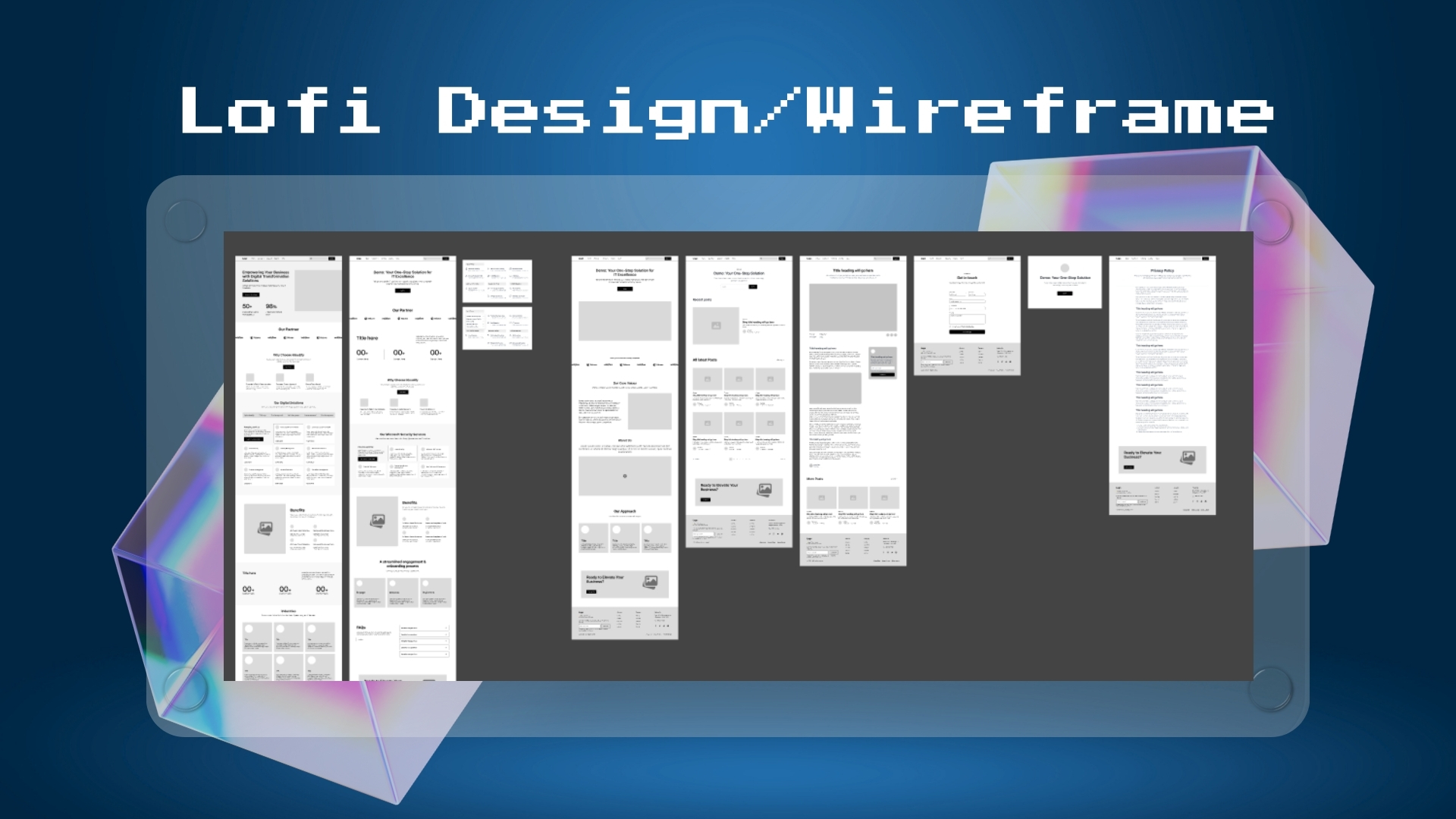
Start with wireframes showing basic layouts and element placement. No colors or fancy graphics yet. Just structure. Wireframes help you test usability before investing in detailed design work.
Test these wireframes with real users. Watch them try to complete tasks. Their struggles show you what needs work. Iterate based on feedback before moving forward.
Before investing in high-fidelity design, validate your direction with stakeholders. Present wireframes to leadership and key team members. Document all feedback systematically.
This step prevents costly revisions later. Stakeholders who contribute early become champions for the redesign. Incorporate feedback that aligns with user needs and business goals.
Move to high-fidelity prototypes next. Add your brand colors, typography, images, and interactive elements. Create designs that work on desktop, tablet, and mobile. Responsive web design isn't optional anymore.
Focus on conversion optimization too. Where should calls-to-action sit? What button colors drive clicks? Good UX removes obstacles between users and their goals.
Build interactive prototypes that simulate real functionality. Run usability testing sessions. Give users specific tasks to complete. Observe where they struggle. The more you refine in phase 3, the smoother development goes.
Phase 3 brings your vision to life visually. For complex projects, partnering with UI UX development experts ensures your designs translate effectively to code.
Development brings your designs to life. But rushing here causes SEO disasters.
Work closely with your development team from the start. Use clear handoff documentation with detailed specifications and annotations. Build in a staging environment first so you can test everything before it goes live.
Mind your SEO throughout development. Create a redirect mapping document before changing any URLs. Every important page needs a 301 redirect to its new location. According to SEO experts, 301 redirects pass almost all SEO value from old pages to new ones.
Critical SEO migration steps:
Optimize the mobile experience during development. Check load times constantly. Compress images without sacrificing quality. Websites optimized for mobile see 32% higher average page views per visit.
Implement lazy loading for images below the fold. Use modern image formats like WebP. Test performance continuously throughout development using Google PageSpeed Insights.
Phase 4 turns designs into functional reality.
You're almost there. But launching too fast creates problems that haunt you for months.
Perform A/B testing on key elements if time allows. Run usability testing with people who've never seen your site. Test every form multiple times. Verify emails arrive correctly.
Pre-launch testing checklist:
Launch your new site during low-traffic hours. Set up monitoring before you flip the switch. Have Google Analytics open. Watch Google Search Console. Be ready to roll back if critical issues appear.
Check analytics immediately after launch to ensure tracking works. Watch for crawl errors. Monitor site speed under real traffic. Track user behavior closely for the first week. Compare metrics to your pre-launch baseline.
Phase 5 determines if your redesign succeeds. Take your time here. Thorough testing prevents embarrassing failures and protects the investment you've made in the redesign process.
Timeline matters. You need realistic expectations.
Most website redesigns take 2-12 weeks depending on scope. Small sites with 10-20 pages? Plan for 2-4 weeks. Mid-sized sites with 50-100 pages? Budget 6-10 weeks. Large enterprise sites with hundreds of pages? You're looking at 10-16 weeks minimum.
Several factors affect how long it takes. Custom functionality adds weeks. Content creation delays projects more than anything else. According to industry research, clients writing website content is the number one delay. Stakeholder approvals slow things down too when decision-making isn't clear.
Want to avoid delays? Make decisions quickly. Provide content early. Assign one person final approval authority. Poor planning extends timelines by months. Research shows 68% of redesigns are delayed due to inadequate preparation.
Budget conversations get uncomfortable. Let's talk numbers honestly.
The cost of redesigning your website depends on complexity, functionality, and whether you're building from scratch or updating existing infrastructure. According to recent industry surveys, the average redesign cost in 2025 is $42,500. But that number varies wildly based on what you need.
Small Business Site ($3,000 - $15,000) 10-20 pages with template-based design and customization. Basic SEO optimization, standard contact forms, and mobile responsive layout.
Mid-Size Site ($15,000 - $50,000) 30-100 pages with custom design work. Advanced functionality like member portals and calculators. Professional copywriting, comprehensive SEO strategy, and CRM integration.
Enterprise Site ($50,000 - $150,000+) 100+ pages with fully custom design and development. Complex integrations including payment gateways, APIs, and databases. Multiple user roles, advanced analytics setup, and ongoing support.
Pricing models differ across agencies. Hourly rates for designers range from $50-$200 per hour. Fixed project pricing gives you predictable costs. Monthly retainer agreements work well for ongoing work.
What influences cost? Site complexity matters most. E-commerce functionality, custom databases, and third-party integrations all increase prices. Content creation adds thousands if you hire professional writers. SEO services cost extra but protect your rankings.
Intuitia specializes in building custom websites from scratch with design-led development that drives results. Their transparent pricing reflects real value:
Single-Page / Landing Page ($1,000 - $3,200) High-impact design implementation. Fully responsive and SEO ready. Ideal for campaigns or personal profiles.
Multi-Page Corporate Site ($3,000 - $6,000) 5-6 custom pages with full CMS integration. Standard animations and professional copywriting included.
Booking & Service Integration ($4,000 - $12,000) Integrated reservation and booking systems. Payment gateway setup with advanced functional requirements.
Full E-Commerce + Booking Suite ($5,000 - $20,000) Complete Shopify or WooCommerce setup. Product catalog, cart, and checkout flow. Combined booking and order capabilities with advanced API integrations.
Get a custom quote from Intuitia to see how design-led development can transform your digital presence without breaking the budget.

Different platforms require different approaches. Here's how to tackle each one.
E-commerce redesigns need extra care. Breaking your checkout loses sales immediately.
Duplicate your current theme before making changes. Test checkout flow extensively before launch. Optimize product pages for conversions and ensure payment gateways work correctly. Check shipping calculations and review mobile checkout experience thoroughly.
Shopify themes offer built-in responsiveness. Focus your energy on conversion optimization rather than fixing mobile layouts.
Squarespace 7.1 simplified redesigns by eliminating different versions. All templates now share the same structure.
Switching templates maintains your content. Your text, images, and pages transfer automatically. Layout adjustments happen, so review every page after switching. Check spacing, alignment, and element positioning.
Use Squarespace's built-in style editor for design customization. Adjust fonts, colors, and spacing without touching code. Preview changes before publishing.
Figma has become the standard for website redesign mockups. Create a new file with artboards for each page. Build a component library for reusable elements. Design mobile, tablet, and desktop versions.
Add interactive prototypes to show user flows. Share with stakeholders for feedback. Generate design specs for developers. Figma's collaborative features shine during redesign projects. Multiple team members can work simultaneously while comments keep feedback organized.
Framer combines design and development into one powerful tool. Start by creating responsive layouts directly in Framer's visual editor. The platform's code components let you add custom interactions without leaving the design environment.
Build live prototypes that feel like real websites. Framer automatically generates production-ready code. Publish directly from the design file or export code for custom hosting. The built-in CMS makes content updates simple for non-technical team members.
Webflow bridges the gap between design and development seamlessly. Design visually while Webflow writes clean, semantic code in the background. Create responsive designs using Webflow's flexible grid system and breakpoint controls.
Build complex interactions and animations with Webflow's visual animation editor. No coding required. The CMS functionality allows dynamic content without database setup. Export code if needed or host directly on Webflow's fast, secure infrastructure.
WordPress powers millions of sites for good reason. Flexibility plus a massive plugin ecosystem make redesigns manageable.
Set up a staging site using a plugin like WP Staging. Choose a new theme or build custom with a page builder. Install necessary plugins for functionality. Migrate content carefully, checking formatting. Test everything on staging before pushing live. Use a redirect plugin for URL changes.
WordPress staging sites let you test changes safely. Never redesign directly on your live site.
Wix makes redesign straightforward with its drag-and-drop editor. Changing templates doesn't automatically transfer your content, so you'll need to manually recreate pages.
Back up your content first. Take screenshots of current layouts. Then switch templates and rebuild. Keep your site in draft mode while redesigning. Wix lets you work privately until you're ready to publish. Test mobile versions thoroughly since Wix generates separate mobile layouts.
This section deserves your full attention. Get SEO wrong and traffic vanishes overnight.
Protect your rankings by treating migration like moving a business. You wouldn't relocate without telling customers where you went. Same principle for search engines.
Step by step SEO-safe redesign:
Before Launch:
During Development:
After Launch:
According to SEO specialists, properly implementing 301 redirects maintains traffic and backlink popularity on the new site version. This protects years of SEO work from disappearing.
Common SEO mistakes include changing URLs without redirects, removing important content, or drastically altering site structure. Each causes ranking drops. Avoid them by planning carefully and testing thoroughly.
Pretty designs don't pay bills. Conversions do.
Focus your redesign on removing friction from user journeys. Every extra click costs conversions. Every confusing menu item sends people away. According to research from Forrester, a seamless UX design can boost conversion rates up to 400%.
UX principles that improve results:
Clear visual hierarchy guides eyes to important elements. Use size, color, and placement to show what matters most. Primary calls-to-action should stand out immediately. Secondary actions stay subtle. Choosing the right website color scheme impacts both aesthetics and conversion rates.
Simplify navigation ruthlessly. Can users find key pages in two clicks? If not, restructure. Research shows 94% of users say easy navigation is the most important website feature. Make menus obvious. Use clear labels. Avoid clever naming that confuses people.
Speed matters more than you think. A one-second delay in load time causes a 7% decrease in conversions. Compress images. Minimize code. Use content delivery networks. Fast sites convert better.
Conversion optimization tactics:
Test different approaches through a/b testing. Data shows what works. Opinions don't. Small changes like button color or headline copy can dramatically impact results. Perform a/b tests on high-traffic pages first to gather meaningful data quickly.
Modernization means meeting current expectations. Users expect sites to load in under three seconds. They expect mobile experiences that work flawlessly. They want accessible designs that accommodate disabilities. Deliver on these basics before adding fancy features. For mobile-first approaches, explore mobile app UX design principles that translate well to responsive websites.
Learning from others' mistakes saves time plus money.
Mistake #1: Skipping User Research You think you know what users want. You're probably wrong. Assumptions lead to redesigns that look good but don't perform. Solution: Conduct user research before making design decisions. Interview customers. Review behavior analytics. Test prototypes with real users.
Mistake #2: Changing Everything at Once Major overhauls overwhelm users plus increase risk. When everything changes, you can't identify what caused problems. Solution: Consider phased rollouts. Change sections gradually. Test each phase before moving forward.
Mistake #3: Ignoring SEO Until After Launch Fixing SEO problems after launch means losing rankings you may never recover. Solution: Build SEO into every phase. Create redirect plans early. Preserve URL structures. Test before going live.
Mistake #4: Not Setting Clear Goals "Make it look better" isn't a goal. Without specific objectives, you can't measure success. Solution: Set SMART goals. Track specific metrics. Know what success looks like before starting.
Mistake #5: Forgetting About Mobile Designing desktop-first fails when 59% of global website traffic comes from mobile devices. Solution: Design mobile-first. Test extensively on real devices. Optimize touch targets and thumb-friendly navigation.
Mistake #6: Launching Without Testing Broken forms, missing images, or slow pages frustrate users immediately. Solution: Run a comprehensive QA process. Check every page, form, and feature. Test on multiple browsers and devices.
Mistake #7: Not Planning for Content Beautiful designs need great content. Placeholder text on launch day looks unprofessional. Solution: Create or update content during development, not after. Hire writers if needed. Approve everything before launch.
Avoid these mistakes and your redesign has better odds of success.
Use this comprehensive checklist to ensure you cover all bases.
UX Audit
Content Audit
SEO Audit
Technical Audit
Analytics Review
According to research, comprehensive audits catch problems early. The more thorough your preparation, the smoother your redesign goes. Industry data shows 80.8% of redesigns happen because of low conversion rates, 65.4% for high bounce rates, and 61.5% for better user experience. Your audit reveals which issues matter most.
Launching is just the beginning. Now you need to prove it worked.
Key performance indicators to track:
Traffic metrics show if your redesign maintains or improves visibility. Monitor overall traffic, organic search traffic, plus referral traffic. Compare numbers to your pre-redesign baseline. Expect minor fluctuations for 2-4 weeks after launch as search engines reindex your site.
Engagement metrics reveal if users like your new design. Track bounce rate, pages per session, and average session duration. Decreases in bounce rate signal better user experience. Increases in pages per session mean improved navigation.
Conversion metrics matter most. Track goal completions, form submissions, and purchases. Calculate conversion rates by dividing conversions by total visitors. Even small percentage improvements generate significant revenue.
ROI calculation:
User feedback provides qualitative data. Survey customers about their site experience. Monitor support tickets for usability issues. Read comments and reviews mentioning your website.
SEO performance takes longer to measure. Check rankings for key terms monthly. Monitor organic traffic growth. Review backlink profile to ensure link equity transferred properly. Track changes in domain authority over time.
Set up automated reports in Google Analytics. Review weekly for the first month, then monthly. Look for trends rather than day-to-day fluctuations. Compare year-over-year performance to account for seasonal variations.
Good redesigns show measurable improvements within 90 days. Traffic stabilizes. Conversions increase. User satisfaction goes up. If numbers don't improve, dig into analytics to understand why then iterate.
Website redesign is a substantial undertaking, but it delivers results when executed properly. We've covered the complete process from discovery through measurement. You now understand the five critical phases, how to protect your SEO, common mistakes to avoid, plus how to measure success.
Remember these key takeaways. Start with thorough research rather than assumptions. Set clear, measurable goals before designing anything. Mind your SEO throughout every phase to protect rankings. Test extensively before launching. Then measure results against your baseline metrics.
The biggest mistake is waiting too long to redesign. Technology evolves. User expectations shift. Competitors improve their sites. According to industry recommendations, 68% of agencies suggest redesigning every 2-3 years, while 24% recommend every 3-5 years.
Ready to start your redesign? Begin with the phase 1 discovery work. Audit your current site, research your users, and analyze competitors. Those insights guide every decision you'll make moving forward. Take your time in planning. Rush the strategy phase and you'll waste money fixing problems later.
Your website represents your business 24/7. Need help getting started? Contact our team to discuss your redesign goals.
What is the first step in redesigning a website?
The first step is conducting a comprehensive website audit. Review your analytics data, identify user pain points, analyze competitor sites, and document what's working versus what needs improvement. This discovery phase establishes your foundation for all redesign decisions.
How do I redesign my website without losing SEO rankings?
Implement 301 redirects for every URL that changes, maintain similar URL structures when possible, preserve high-performing content, and keep your site architecture intact. Create a redirect mapping document before development starts and test redirects on a staging site before launching.
How long does a complete website redesign take?
Timeline varies by project scope. Small sites typically take 2-4 weeks, mid-sized sites need 6-10 weeks, and large enterprise sites require 10-16 weeks or more. Factors affecting timeline include custom functionality, content creation, and stakeholder approval processes.
How much does it cost to redesign a website in 2025?
According to industry data, the average website redesign costs $42,500 in 2025. Small business sites range from $3,000-$15,000, mid-sized sites cost $15,000-$50,000, and enterprise sites run $50,000-$150,000+. Costs depend on site complexity, custom features, content needs, and your chosen development approach.
Should I redesign or rebuild my website?
Redesign when your site's structure works but needs visual updates, improved UX, or modern features. Rebuild when you're changing platforms, undergoing major rebranding, or working with severely outdated technology. Rebuilds cost more but provide a fresh foundation for growth.
What mistakes should I avoid during a website redesign?
Common mistakes include skipping user research, ignoring SEO until after launch, changing everything simultaneously, not setting measurable goals, forgetting mobile optimization, launching without thorough testing, and inadequate content planning. Each mistake costs time, money, or traffic.
How do I measure the success of a website redesign?
Track traffic metrics (overall traffic, organic search), engagement metrics (bounce rate, pages per session), and conversion metrics (goal completions, form submissions, sales). Calculate ROI by comparing revenue increases to redesign costs. Monitor for at least 90 days to see meaningful trends emerge.



.svg)









.svg)