
You typed a prompt into an AI website builder, watched a homepage appear in seconds, and now you're staring at two names: Framer AI and Webflow AI. Both promise speed. Both use the word "AI" on their homepage. But they solve completely different problems, and picking the wrong one costs you weeks of rework later.
Here's the short version. Framer AI generates a full, editable website from a single prompt and hands you a Figma-style canvas to refine it. Webflow AI works more like a co-pilot, helping you build sections and style content inside a structured, code-based system. One is built for speed. The other is built for control.
This guide breaks down how each AI actually works, where each platform wins, what they cost, and how to decide based on your specific project, not just the marketing copy on their homepages.
Framer AI suits you if you want speed and a visual, prompt-to-site workflow. Webflow AI suits you if you need deep structural control and long-term scalability. That's the core split, and almost every other difference flows from it.
Now let's unpack why these differences matter for your actual project, starting with how each AI works under the hood.
Framer AI acts as a creative generator. You type a prompt describing your site, and within seconds it builds a complete, responsive, multi-page layout you can start editing right away.
That instant-draft approach is what sets Framer apart from most so-called AI website builders. It doesn't hand you a static mockup you have to rebuild from scratch.
It gives you real, editable pages on a freeform visual canvas that feels almost identical to Figma, drag layers, adjust spacing, tweak type, and the change shows up live.
Framer's newer Agents layer takes this further, editing existing pages, CMS entries, and SEO fields directly, so you're refining a real site rather than starting a new draft every time you want a change.
For a solo designer or a small marketing team, that combination of instant output and familiar canvas controls means you can go from blank page to a shippable homepage in an afternoon.
That said, speed has a cost. Because Framer's AI generates a full design in one pass, the output often needs a trained eye to fix spacing inconsistencies, generic type scales, and layout choices that look fine on the first screen but fall apart three sections down. Which brings us to the platform built for a different kind of control.
Webflow AI acts as a technical co-pilot rather than a full-site generator. It helps you build components, style sections, and structure pages, but it won't hand you a finished multi-page site from a single prompt the way Framer does.
Webflow's foundation is a class-based visual development model. Underneath the visual interface, you're working with real HTML, CSS, and JavaScript logic, which means understanding the box model, flexbox, and grid actually helps you build faster, not just look smarter doing it.
The AI tools sit on top of that structure, generating individual sections, suggesting styles, or writing copy variations you then place manually.
That structure is exactly why serious development teams reach for Webflow when a project outgrows a simple landing page. Semantic HTML output, native support for complex relational CMS collections, and granular control over every class make it the platform of choice for content-heavy sites and B2B platforms that need to scale over years, not weeks.
The tradeoff is time. Webflow rewards patience with structural control, while Framer rewards speed with a gentler learning curve. Neither approach is wrong. It depends entirely on what your project needs, and that's exactly what the next section breaks down feature by feature.
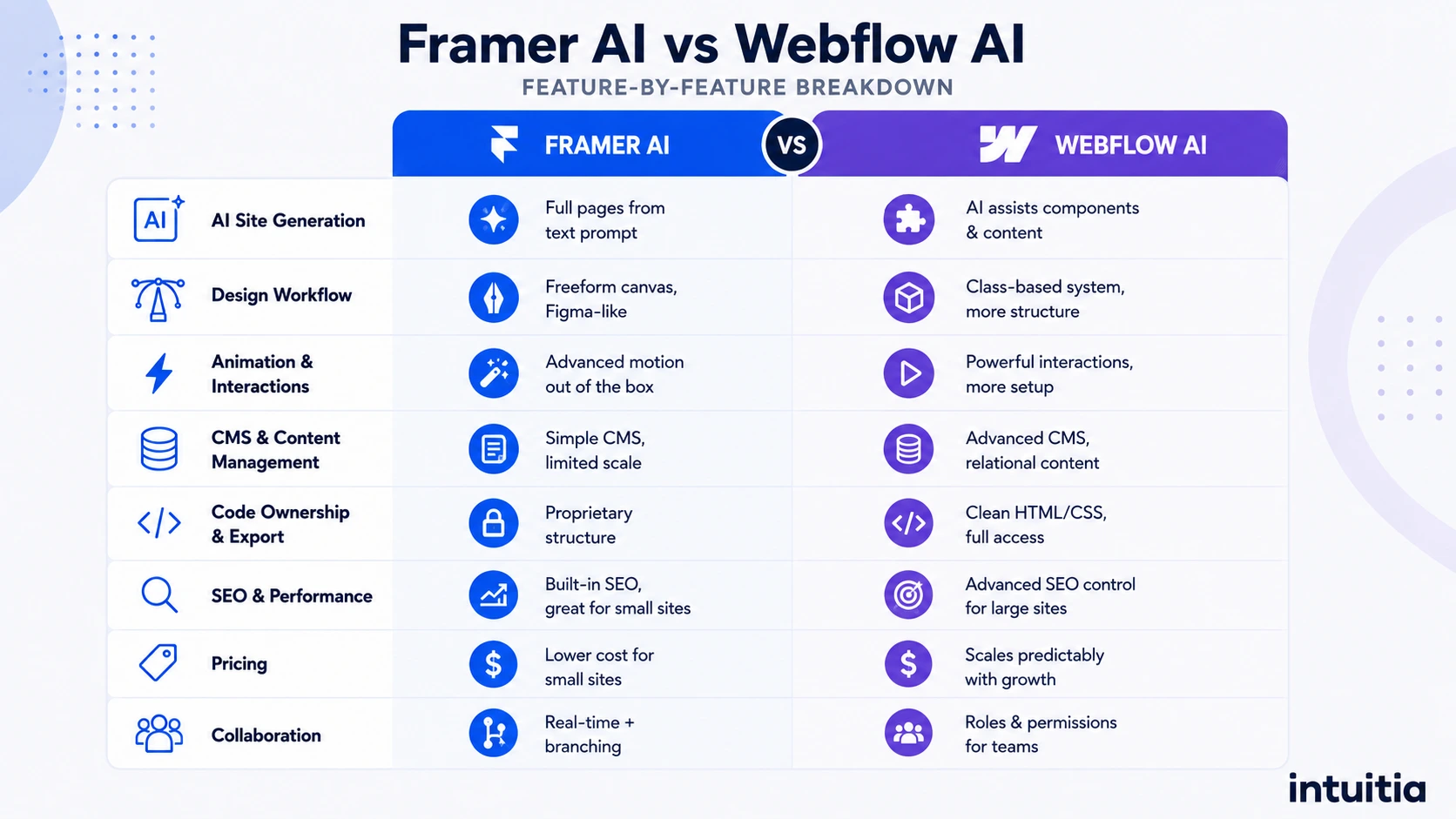
The clearest way to compare these platforms is side by side across the features that actually affect your day-to-day work, not just the marketing headlines. Here's how they stack up.
Framer's AI generates entire pages from a text prompt, while Webflow's AI assists with individual components and copy. If you want a working draft in minutes, Framer wins this round outright. If you want AI help while you build a more deliberate structure, Webflow's assisted approach fits better.
Neither tool replaces a human editor. Every AI-generated draft we've reviewed, on either platform, needed manual cleanup on typography hierarchy, image cropping, and mobile breakpoints before it was ready to publish. Treat the AI output as a strong first draft, not a finished product.
Framer's freeform canvas mirrors Figma, so most designers feel productive within their first hour. Webflow's class-based system asks you to think in boxes, containers, and CSS logic, which takes longer to learn but pays off with more precise control once you get there.
If your team already designs in Figma, Framer will feel familiar almost immediately. If your team includes a developer who wants to touch real code, Webflow's structure will feel like home base instead of a workaround.
Framer holds a clear edge here. Native support for scroll-linked animations, 3D transforms, and hardware-accelerated motion makes it the stronger pick for visually rich, interaction-heavy pages like product launches or portfolio sites.
Webflow can absolutely handle animation too, through its interactions panel, but it takes more manual setup to achieve the same fluid feel Framer offers out of the box.
Webflow's CMS handles complex, relational content far better than Framer's. If your site needs linked authors, categories, and cross-referenced posts, Webflow's collection structure supports that natively. Framer's CMS works well for simpler use cases like a blog or a portfolio, but it caps collection sizes on entry-level plans, which matters once your content library grows.
For teams planning a content hub or a resource center rather than a handful of marketing pages, this difference alone often decides the platform.
Webflow generates clean, semantic HTML and CSS you can inspect, extend, or hand off to a developer. Framer keeps more of its structure proprietary to the platform, which streamlines the editing experience but limits how much raw code you can extract if you ever need to migrate elsewhere.
Both platforms offer solid built-in SEO tools, including editable metadata, sitemaps, and redirects. Webflow generally has the edge for larger, SEO-heavy sites thanks to deeper schema markup support and more granular control over canonical tags. Framer keeps SEO settings closer to the page editor, which works well for smaller sites that don't need enterprise-level schema customization.
Whichever platform you choose, the technical setup only gets you halfway there. A well-planned conversion rate optimization strategy still matters more than which builder generated your metadata fields.
Pricing structures differ more than the entry price suggests, so it deserves its own section below. For now, know that Framer tends to be cheaper for small, simple sites, while Webflow's plans scale more predictably as your content and traffic grow.
Both platforms support real-time collaboration. Framer adds a branching system for reviewing changes before they go live, similar to how developers manage code. Webflow offers workspace roles and permissions built for larger teams juggling multiple site owners and stakeholders.
Taken together, these differences point toward two very different kinds of projects. Let's map them to real use cases so you can see exactly where your project lands.
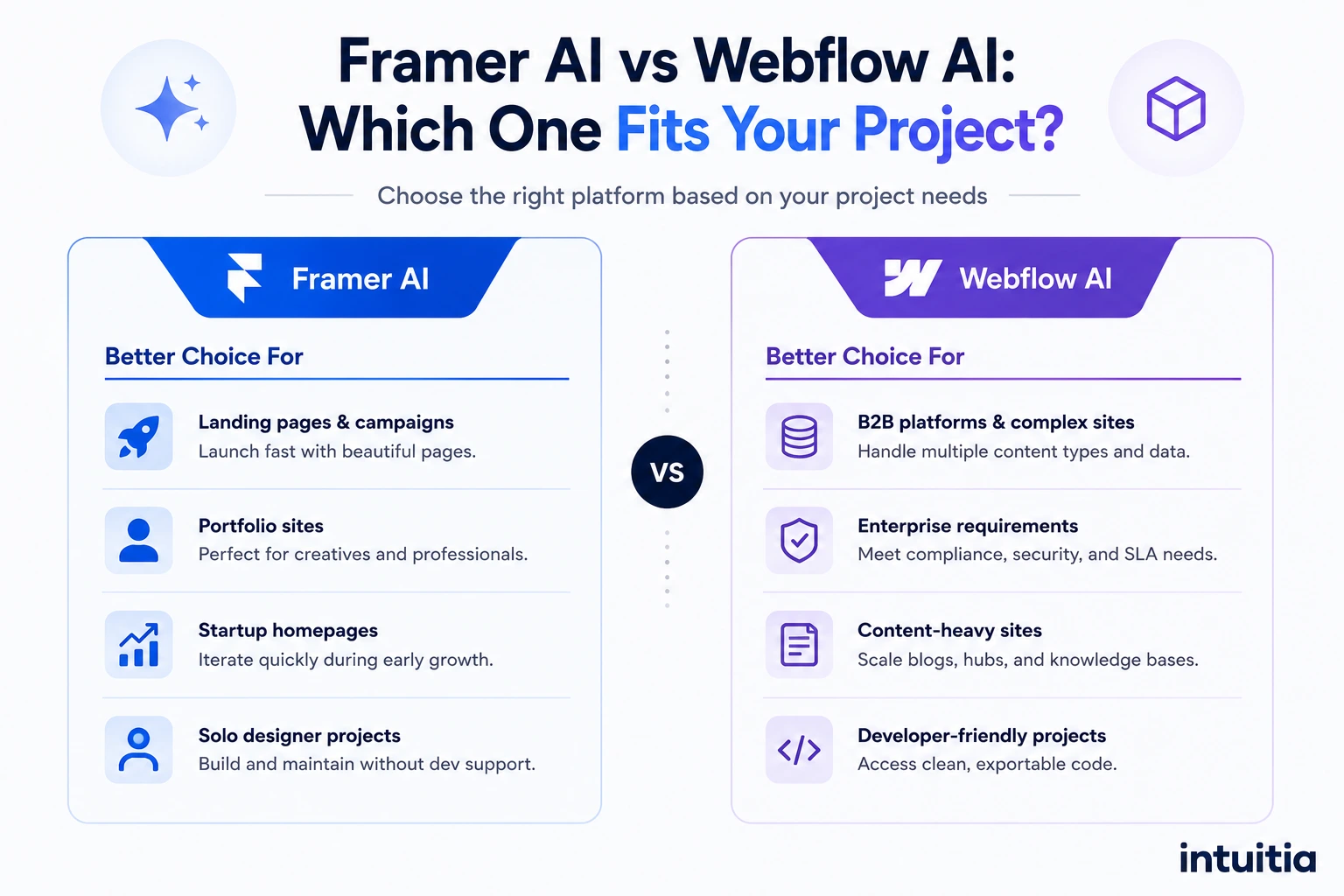
Framer AI fits solo designers, agencies, and marketing teams building landing pages and portfolios fast. Webflow AI fits larger teams building complex, content-heavy platforms that need to scale for years. Here's the breakdown by project type.
Framer earns its reputation with projects where speed and visual polish matter more than deep content architecture.
If your project checks most of these boxes, Framer will likely get you to a polished result faster than any other tool on the market, including Webflow. Our team frequently recommends it for early-stage landing page work where speed to market drives the decision.
Webflow earns its place when a project's complexity outgrows what a freeform canvas can comfortably manage.
Companies planning a long-term digital presence, not just a campaign page, tend to outgrow Framer's simpler CMS eventually. If that sounds like your situation, a proper B2B website strategy built on Webflow's structure will save you a painful migration down the road.
Either way, the platform is only step one. Understanding what each one actually costs is step two, and the sticker price rarely tells the whole story.
Framer's entry plan starts cheaper than Webflow's, but Webflow's tiers scale more predictably once your content and traffic grow. Here's how the published pricing tiers compare.
Note that both companies adjust pricing periodically, so confirm current rates directly on each platform before budgeting.
The lower entry price on Framer makes it tempting for a first project, but the real cost of either platform rarely lives in the subscription fee.
It lives in the hours spent fixing spacing issues, rebuilding a rushed information architecture, or hiring someone later to clean up an AI-generated draft that never quite looked right. A SaaS website design agency project, for example, often needs custom CMS structuring that goes well beyond what either platform's starter tier includes.
That's worth remembering as we move into the mistakes we see teams make most often with AI website builders, on either platform.
The biggest mistake teams make is treating AI-generated output as a finished website instead of a working draft. AI can build fast, but it can't make strategic decisions about your users, your brand, or your conversion goals.
Watch for these common traps:
Every one of these mistakes traces back to the same root cause: mistaking a fast starting point for a finished product. And that distinction is exactly where the real decision-making needs to happen.
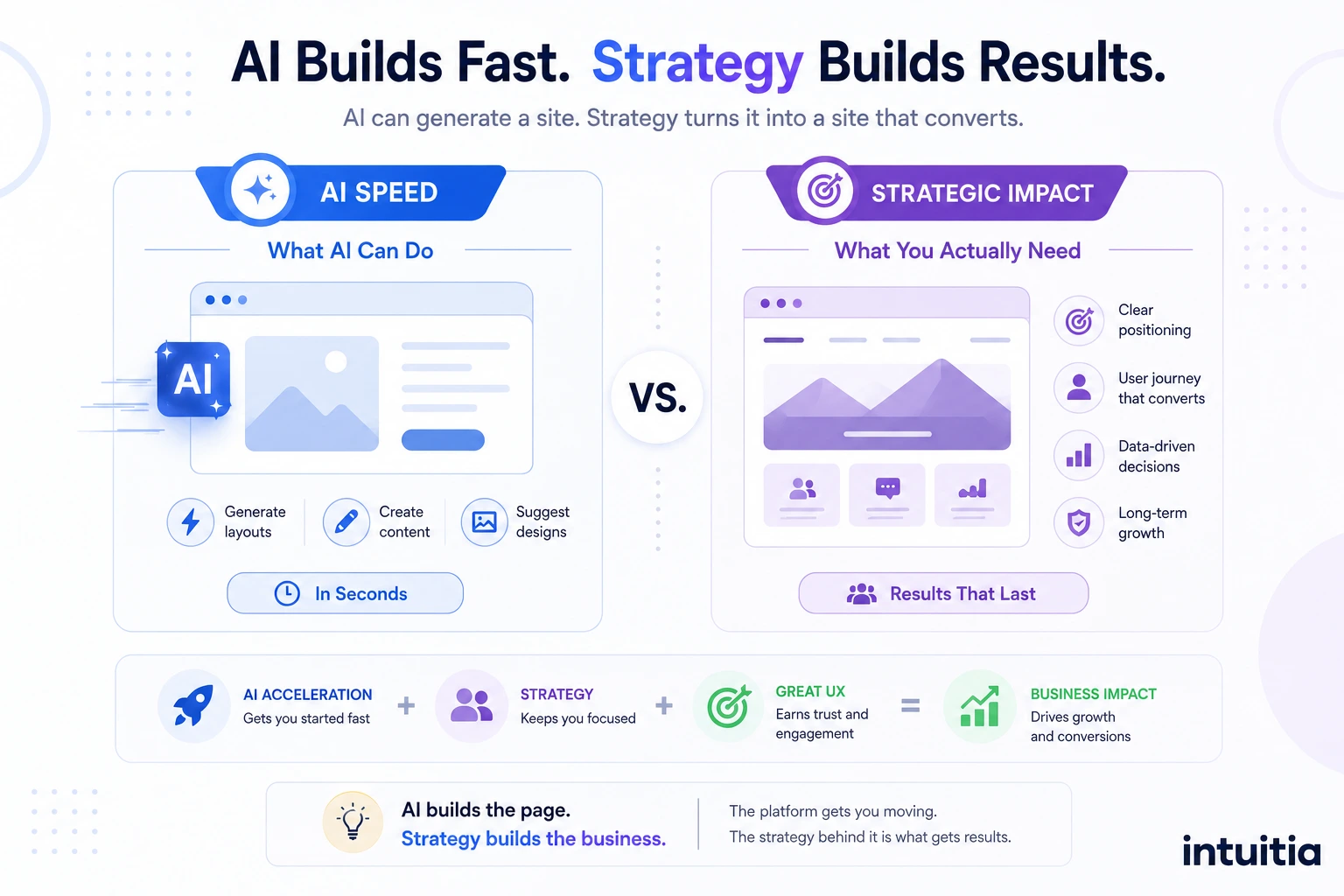
AI can generate a homepage in seconds, but it can't decide your positioning, map your user journey, or know why one layout will convert better than another for your specific audience. That strategic work still requires human judgment.
The website builder market has grown fast, with AI-powered design tools now growing at roughly 26 percent year over year according to recent industry tracking, and it's easy to see why. Speed sells. But speed without strategy just gets you to a mediocre result faster.
That gap between "I generated a homepage" and "I have a site built to convert" is where an experienced team earns its keep, regardless of which platform you choose.
At Intuitia, we work across both Framer and Webflow, pairing AI-assisted speed with real UX design consulting so the site you publish actually reflects how your users think and move through a page, not just what a prompt generated on the first try.
You can see examples of that approach across our portfolio, where AI-accelerated builds meet hands-on design refinement.
Whether you're launching a landing page in Framer or scaling a content platform in Webflow, the platform gets you moving. The strategy behind it is what determines whether visitors stay, trust your brand, and convert.
Choose Framer AI if you're a solo designer or small team shipping a landing page, portfolio, or marketing site fast, and you want a Figma-like canvas that keeps things simple. Choose Webflow AI if you're building a B2B platform, content hub, or enterprise site that needs deep structural control and room to scale for years.
Neither platform is objectively better. They're built for different jobs, and the right choice depends on your project's complexity, your team's technical comfort, and how far you expect the site to grow. If you're still unsure after weighing all of this, the safest move is starting with a clear content and design plan before opening either tool, since that decision matters more than the platform itself.
Is Framer AI better than Webflow AI for beginners?
Yes, generally. Framer's canvas feels more intuitive for non-developers, especially anyone familiar with Figma, while Webflow's class-based system takes longer to learn but rewards that investment with more precise control.
Can Webflow AI build a full website from a prompt like Framer?
Not quite. Webflow AI assists with individual sections, styling, and content rather than generating an entire multi-page site from one prompt. Framer's AI is built specifically for that full-generation workflow.
Which platform is better for SEO, Framer or Webflow?
Webflow generally has the edge for larger, SEO-heavy sites because of its deeper schema markup support and more granular technical controls. Framer's built-in SEO tools handle smaller marketing sites well without requiring as much manual setup.
Is Framer or Webflow better for e-commerce?
Webflow supports native e-commerce with more built-in features. Framer doesn't offer native e-commerce, so selling products usually requires a third-party integration like Shopify.
Can you switch from Framer to Webflow later?
Yes, but it's not a simple copy-paste export. Framer's canvas-based layouts and Webflow's structured box model work differently, so migrating means rebuilding pages, remapping CMS fields, and setting up proper redirects to protect your SEO. Teams considering this move should plan a structured website redesign rather than expect a quick transfer.
Do I need a developer for Webflow AI?
Not strictly, but it helps. Webflow's visual interface doesn't require coding knowledge, though understanding basic CSS concepts like the box model makes the learning curve much shorter, especially for complex layouts.



.svg)









.svg)